 Throttling by Microsoft 365
AI summary
Microsoft 365 throttles requests to maintain service performance and reliability by limiting the number of requests applications can send per time window. Rencore Governance avoids throttling by sending requests at a steady, low rate throughout the day; if throttling occurs, it pauses as instructed and resumes without losing scanned data. Throttling is rare but may happen when retrieving very large file libraries, drives, or audit logs, and these can be disabled if not needed.
What is throttling?
Microsoft 365Microsoft 365Microsoft 365 is the Microsoft cloud suite of Teams, SharePoint, OneDrive, Exchange and the Office apps.Read more uses throttling to maintain optimal performance and reliability of the service. ThrottlingThrottlingThrottling is how Microsoft 365 limits the requests an application or user can send in a period of time.Read more limits the number of user or application requests or concurrent calls (by script or code) to prevent the overuse of resources.
That said, it is rare for a user to get throttled by Microsoft 365. The service is robust, and it is designed to handle high volumes.
For an application like Rencore Governance or any other 3rd party application that performs a larger amount of requests, throttling can occur if not handled properly.
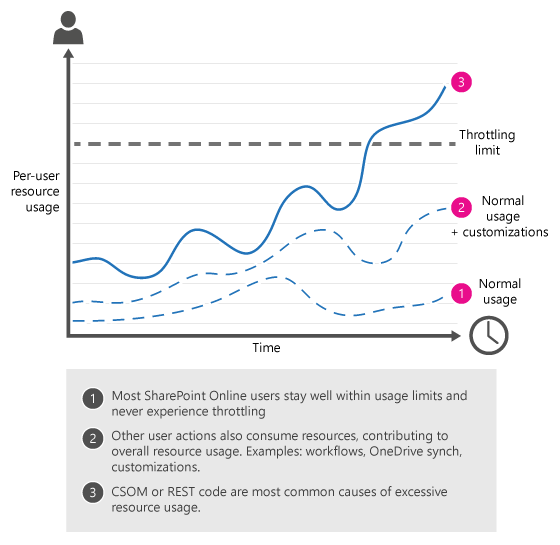
Common throttling scenarios
The most common causes of throttling of clients include:
- A large number of requests across all applications in a tenant.
- A large number of requests from a particular application across all tenants.
What happens when throttling occurs?
When a throttling threshold is exceeded, Microsoft 365 limits any further requests from that client/application for a period of time. When throttling occurs, Microsoft 365 returns the HTTP status code 429 (Too many requests), and the requests fail.
Microsoft GraphMicrosoft GraphMicrosoft Graph is the Microsoft API that gives access to the data of the Microsoft 365 services.Read more
“When a throttling threshold is exceeded, Microsoft Graph limits any further requests from that client for a period of time.” (Microsoft)
Microsoft SharePoint
“SharePoint Online uses throttling to maintain optimal performance and reliability of the SharePoint Online service. Throttling limits the number of API calls or operations within a time window to prevent overuse of resources.” (Microsoft)
A suggested wait time is returned in the response header of the failed request. Throttling behavior can depend on the type and number of requests. For example, if the application has a high volume of requests, all requests types are throttled. Threshold limitsAutomation thresholdAn automation threshold, or threshold limit, caps how many objects an automation processes in one day.Read more vary based on the request type. Therefore, you could encounter a scenario where writes are throttled but reads are still permitted.
How does Rencore Governance avoid throttling?
Rencore Governance is developed to work within the throttling limits by Microsoft. It reduces the load on the tenant by adjusting scan frequency, speed, and volume to remain below the limits.
Rencore uses a continuous scanning approach and scans your tenant in batches with partial scanning.
Microsoft limits how many requests an app can send. Rencore Governance stays under that limit: it sends requests at a steady, low rate throughout the day, without peaks. If Microsoft still asks it to slow down, it pauses for the time Microsoft gives, waits a little longer, then carries on.
Nothing already scanned is lost. Your Microsoft 365 tenantMicrosoft 365 tenantA Microsoft 365 tenant is the dedicated instance of Microsoft 365 that holds an organization's users, groups, data and settings.Read more and your users notice nothing. Only the data in Rencore Governance takes longer to update.
Rencore’s approach has been successfully tested with very large Microsoft 365 tenants (over 250,000 users) and has seen throttling only happen in rare cases when retrieving:
- file metadata from very large libraries in SharePoint.
- file metadata from very large drives in OneDriveOneDriveOneDrive is the personal file storage of each Microsoft 365 user. The OneDrive connector of Rencore Governance, part of the Digital Workplace module, inventories every OneDrive with its files, folders and file sharing.Read more.
- audit logAudit logThe audit log records the actions performed in a Rencore Governance Workspace, with who did it and when.Read more information from Entra IDMicrosoft Entra IDMicrosoft Entra ID, formerly Azure Active Directory, is the Microsoft identity service behind every Microsoft 365 tenant.Read more. If any of those entities are not relevant for the customer to be retrieved, they can also individually be disabled to further reduce the risk of throttling.
Resources
Handling of throttling according to MS:
Frequently asked questions
Can Rencore Governance be throttled by Microsoft 365?
Can Rencore Governance be throttled by Microsoft 365?Yes. Throttling can occur for applications that perform a large number of requests. However, Rencore Governance is designed to work within throttling limits by adjusting scan frequency, speed, and volume to remain below the limits.
How does Rencore Governance handle throttling if it occurs?
Rencore Governance sends requests at a steady, low rate throughout the day without peaks. If Microsoft asks it to slow down, it pauses for the time Microsoft gives, waits a little longer, then continues.
What happens to scanned data if Rencore Governance is throttled?
Your Microsoft 365 tenant and your users notice nothing. The data in Rencore Governance takes longer to update, but nothing already scanned is lost.
Can I disable data sources to reduce throttling risk?
Yes. If you do not need file metadata from large SharePoint libraries, file metadata from large OneDrive drives, or audit log information from Entra ID, you can individually disable these sources to reduce the risk of throttling.
When is Rencore Governance most likely to be throttled?
Rencore Governance has seen throttling only in rare cases when retrieving file metadata from very large SharePoint libraries, file metadata from very large OneDrive drives, or audit log information from Entra ID.
Was this page helpful?
Thanks for the feedback.
Thanks. What was wrong?